Skip to content

In-home AI tutoring · Ages 10–18

Their idea.
Built with AI.
By them.

AI is changing faster than schools can keep up. Your child learns to plan a project, direct AI to build it, and test what it makes, so they start ahead instead of catching up later.

  • Reno & Los Angeles, with NYC dates
  • No coding experience needed
  • Taught personally by Davina Farahi
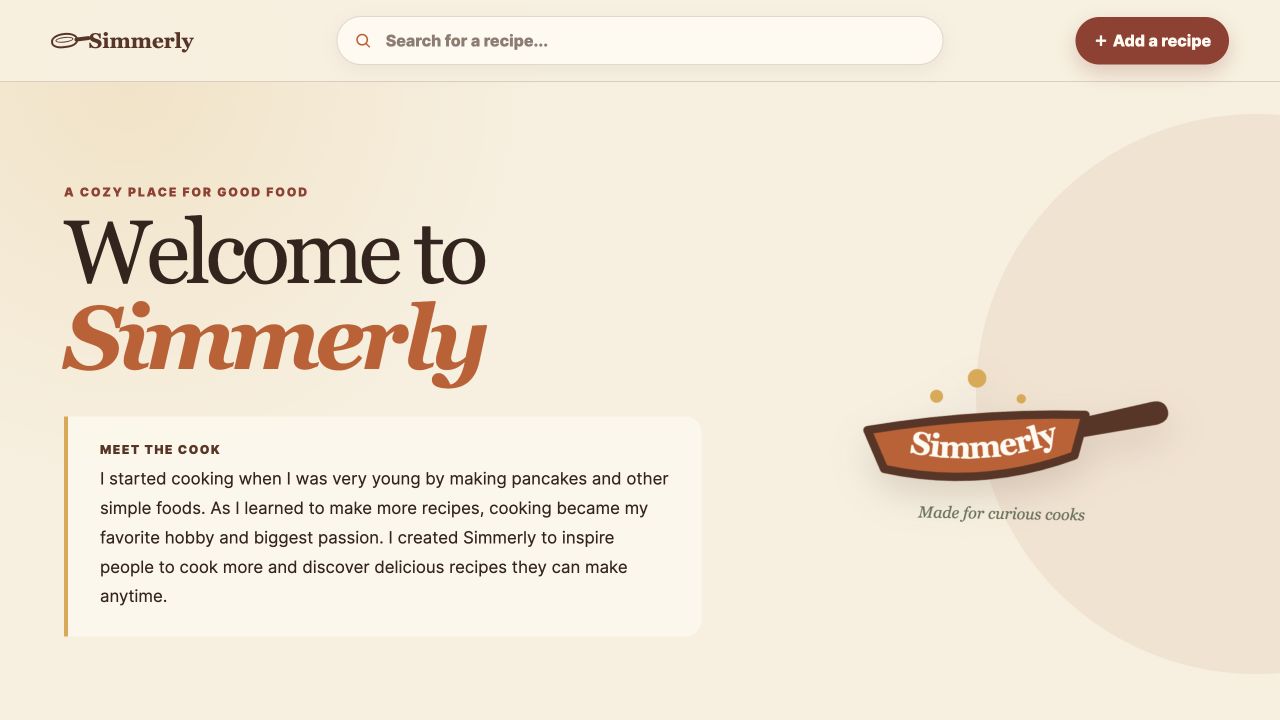
Simmerly, a working recipe website built by Leo, age 10, with recipe search and an add-a-recipe button
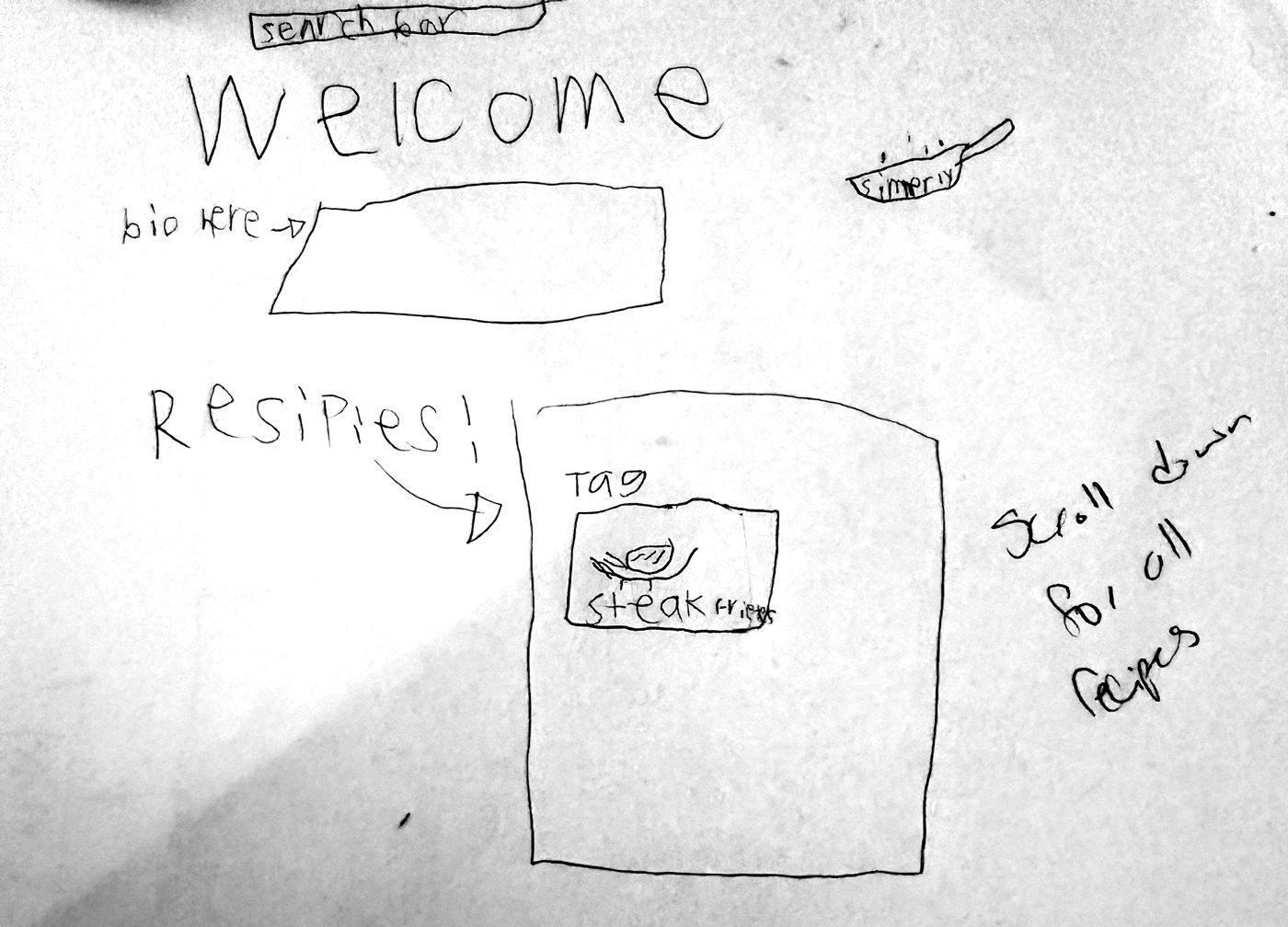
Leo’s hand-drawn plan: a search bar, a Welcome heading, a bio box, a recipes section with a steak frites card, and a note to scroll down for all recipesHis sketch on paper
Leo, age 10. From a paper sketch to Simmerly, a recipe site with search, categories, and recipes he can add and edit. One student’s project. Every learner builds their own idea.

AI is moving fast. Schools aren’t keeping up.

AI is quickly becoming a life skill: a way to build tools, solve problems, and turn ideas into something real. Most kids only know the chat box.

  • 7 in 10U.S. teens had used generative AI by 2024. Common Sense Media ↗
  • 12%of those teens had used it to write code or create an app.
  • 35%of school district leaders said they provide students with training on AI. RAND, 2025 ↗
  • 39%of key job skills are expected to change by 2030, with AI skills growing fastest. World Economic Forum ↗
Chat with AIDirect AI to build a working tool
Take the first answerTest it, check it, and fix what’s wrong
Use apps other people madeMake their own, from their own idea

The kids who learn to direct AI now won’t be catching up later. They’ll already know how.

Start with what they love

What could your
child build?

A favorite interest can become a project worth making. Explore a few starting points, then let your child take the lead.

The idea is just the start.
The learning happens as they use AI to bring an idea to life, taking on work that once needed a whole team.

1. Choose an age group
2. What are they into?

Choose one or two interests.

Loading the idea helper…

The questions parents ask first.

Fair questions. Here are straight answers.

“Won’t AI just do the work for them?”

No. Your child makes the plan and every decision. AI builds drafts, and they test each piece and decide what changes. Younger learners start from a hand sketch. Teens build a full project plan and work through it in stages.

“Is this safe for my child?”

The AI account belongs to you, not your child. For younger learners, I run the account while your child directs the work. Names, addresses, schools, and passwords never go into projects.

“My kid isn’t techy.”

No coding experience needed. If they can describe an idea, they can start. Sessions follow their pace and build on what they already care about.

“Isn’t this just more screen time?”

It’s making, not scrolling. They plan, talk through ideas, build, and test, and every program ends with them explaining what they built and why.

How it works.

Every session is hands-on. I come to your home and work from your child’s ideas, not a script.

  1. Imagine and plan

    They pick an idea they care about and plan it out. Younger learners sketch it by hand. Teens map out a full project plan to build in stages.

  2. Direct and build

    They give AI clear instructions and build one working piece at a time, with me beside them.

  3. Test and show you

    They use the real thing, fix what feels off, and present it to you so you know how to support what comes next.

What they walk away with

  • A working projectSomething real, built from their own idea
  • Their own AI assistantSet up by them, for their project
  • A process to reusePlan, direct, test, improve. On any new idea
  • 6 months of email helpQuestions answered after the last session
  • A head startSkills most schools aren’t teaching yet

Two programs. The right depth for their age.

Start where they are. Maker Studio builds the foundation early. Build Lab takes teens further, so they’re ready for what college and work will ask of them.

Ages 10–13

Maker Studio

For first-time builders. Lots of hands-on guidance while they learn to plan, direct, and check AI.

  • 3 two-hour sessions at home
  • Private, or up to 3 learners
  • Parent handoff in the final 45 minutes

$700 private instruction · complete program

See Maker Studio

Ages 14–18

Build Lab

For teens ready to go further. They learn the tools real developers use and how to connect AI to other apps.

  • 4 two-hour sessions at home
  • Private, or up to 6 learners
  • Parents welcome for the final 15 minutes

$850 private instruction · complete program

See Build Lab

The only other cost is a ChatGPT Plus subscription on a parent’s account, currently $20 per month. You get a setup guide before the first session.

Davina Farahi seated at her laptop

Hi, I’m Davina. I teach every session myself.

I studied early childhood education in college and later worked with children with special needs in an elementary school. I know how kids learn best: at their own pace, from ideas that matter to them.

I’m also the founder and CEO of Shaya Pets, where I use AI to automate real parts of my business. I’ve seen how much becomes possible when you understand the tools and direct them with purpose.

I’ve seen how fast these tools change. The people who learn to direct them early get the biggest advantage. I want kids to get that head start now.

Make With AI brings those two things together. I come to your home, work with your child’s ideas and questions, and make sure the thinking stays theirs.

Davina FarahiFounder, Make With AI
Everything else parents ask.

Still wondering about something? Ask it in the form below and I’ll answer personally.

Getting started

Where do you teach?

In your home, in the Reno and Los Angeles areas. I also schedule New York City session windows throughout the year. If you’re in New York, reach out and I’ll share upcoming dates.

Which program is right for my child?

Maker Studio is for ages 10 to 13 and gives more hands-on guidance. Build Lab is for ages 14 to 18 and goes deeper into the tools developers use, including agents, APIs, and MCPs. If your child is on the edge of an age range, tell me about them and I’ll help you choose.

Can siblings or friends join?

Yes, if you’d like. Families may choose private sessions or bring together siblings and friends who already know one another: up to 3 learners in Maker Studio and up to 6 in Build Lab. Each learner still builds their own project.

What does it cost?

Maker Studio private instruction is $700 for the complete program of three two-hour sessions. Build Lab private instruction is $850 for the complete program of four two-hour sessions. The only other cost is a ChatGPT Plus subscription on a parent’s account, currently $20 per month.

How do we get started?

Send the short inquiry form. I’ll reply within 2 business days about fit, location, and dates. Before the first session, you’ll get a setup guide and a parent acknowledgment to sign. Sessions are confirmed once it’s returned.

Safety and the account

Whose AI account does my child use?

Yours. The account belongs to a parent, who controls the login, payment, and privacy settings. You never share passwords with me or your child. For learners under 13, I run the account during sessions while your child directs the work.

Do parents need to be home?

Yes. For safety, a parent or guardian must remain in the home throughout every tutoring session, even if they are not sitting with us. You’re welcome to sit in at no extra charge. Maker Studio ends with a required 45-minute parent handoff. Build Lab parents may join the final 15 minutes.

What stays private?

Projects never include passwords, addresses, school names, payment details, or other identifying information. Work starts in private files on your computer. Publishing it online or connecting outside services is a separate decision your family makes.

The learning

Why start now instead of waiting?

AI is changing fast, and most schools aren’t teaching kids how to build with it yet. In a spring 2025 RAND survey, only 35% of school district leaders said they provide students with training on AI. Kids who learn now to plan, direct, and check AI build habits that carry into every new tool that comes next.

Will my child become too dependent on AI?

The program teaches the opposite habit. Your child makes the plan, gives clear directions, and checks everything AI produces. They learn to catch AI’s mistakes and decide what to keep, which keeps them in charge of the tool.

What if my child isn’t techy or needs a slower pace?

No coding experience is needed. Sessions follow your child’s pace, and each two-hour session can run slightly shorter or longer when the work calls for it.

What will they make?

Each learner chooses a project connected to something they care about. It might be a website, game, quiz, planner, tracker, portfolio, or another useful digital idea.

What happens after the last session?

For six months, your child or you can email me with questions about their project, getting back into it, or what to try next. It doesn’t include new sessions or building things on their behalf.

Scheduling

What if we need to cancel or reschedule?

Give at least 24 hours’ notice and you can reschedule a session at no charge. Cancellations with less than 24 hours’ notice are charged for that session, since the time was reserved for your child. If you cancel the whole program at least 24 hours before the first session, you get a full refund. With less notice than that, one session’s fee is kept and the rest is refunded. If I ever need to cancel, you choose between rescheduling or a refund for that session. Exact terms are confirmed in writing before your first session.

Give them a head start.

Tell me about your child. You don’t need a project idea yet. Because I teach every session myself, availability is limited. I read every inquiry and reply personally within 2 business days.

  1. 1Send the short form below
  2. 2I reply about fit, location, and dates
  3. 3You get the setup guide and parent paperwork
  4. 4Your first session is confirmed

Ask about a program

Share the program you are considering and your preferred timing. You do not need to have a project idea yet. I will follow up personally about fit and availability.

Prefer a separate window? Open the same inquiry form ↗