A functioning AI agent
Built and shaped by the learner to support their original project.
 Check availability
Maker Studio · Ages 10–13
Your child can learn to give AI direction, question its output, and build something they understand.
Three personal, in-home sessions turn those skills into practice. They shape an agent, plan an original project, and learn how to test and improve it with Davina beside them.
No coding experience needed · Private or up to 3 learners · Reno, Los Angeles & NYC dates
AI is moving fast, and most schools aren’t teaching kids to build with it yet. Maker Studio gives your child a head start: planning, directing, and testing a real project of their own.
What you are investing in
The project gives your child a reason to practice. The lasting goal is knowing how to approach AI with purpose, creativity, and judgment.
Built and shaped by the learner to support their original project.
A working creation based on their own interests and ideas.
A practical structure for planning, building, testing, and improving future ideas.
Reference guides, vocabulary, planning worksheets, and notes explaining the reasoning behind agents and the building process.
For six months after the program, the learner or parent can email Davina with questions connected to what they learned, including AI systems discussed, core fundamentals, their agent or project, and ways to continue practicing.
The three-session path
About six hours of personal instruction, shaped around the learner and their project. Each session builds on the decisions they made in the last.
Session 1
The learner understands the foundations, shapes an agent with a clear job and personality, and chooses the direction for a real project.
Session 2
The learner turns a paper plan into a small working project through short, guided build loops.
Session 3
The learner improves the real result, explains the choices, and learns how to reopen and continue the project after the program.
Session lengths are planned, not rigid. A session may run slightly shorter or longer when the learner’s work calls for it.
A real Maker Studio project
Leo started with a sketch for a recipe website. He built Simmerly, with recipe search, categories, recipe pages, and the ability to add and edit recipes.
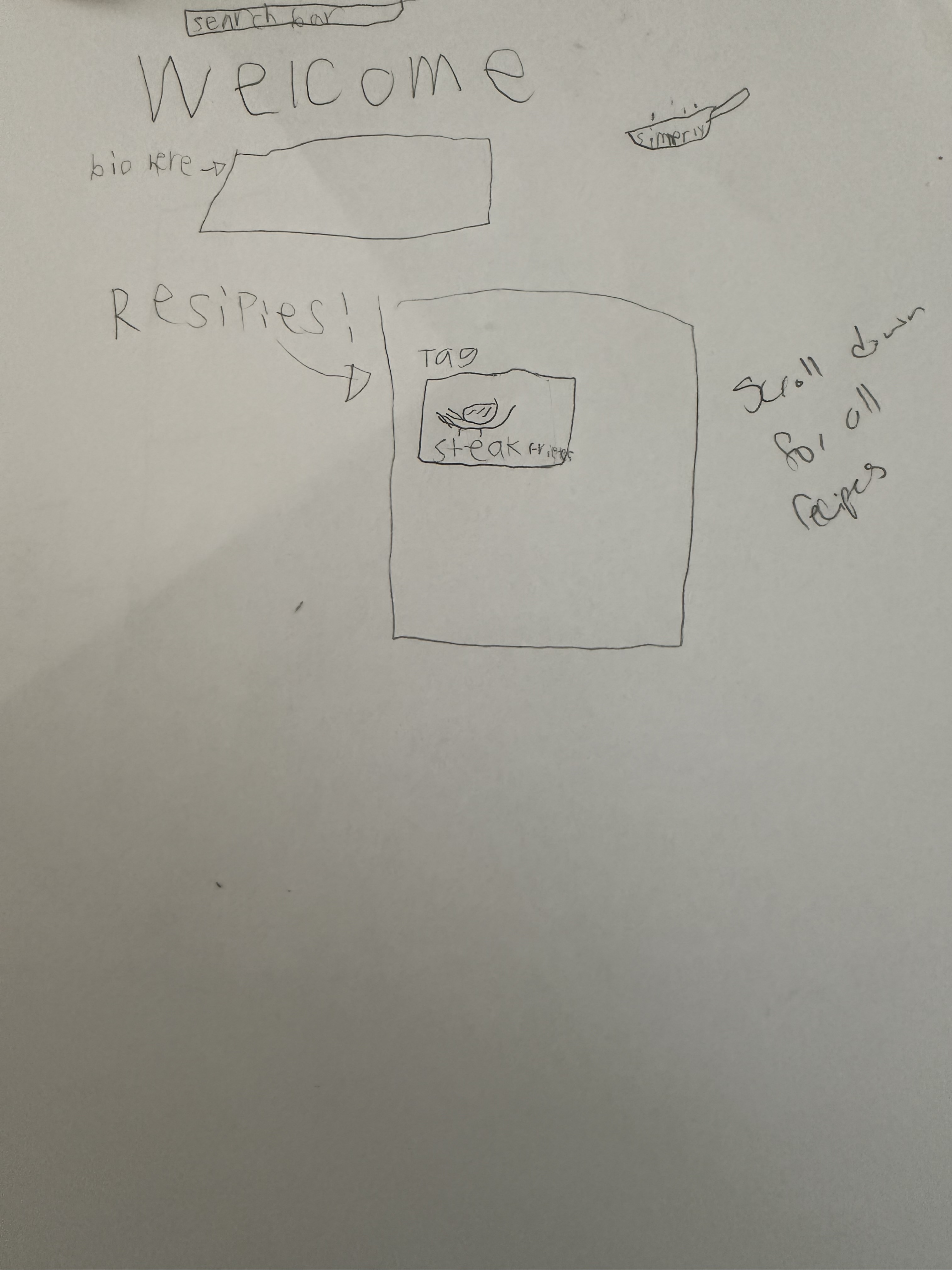
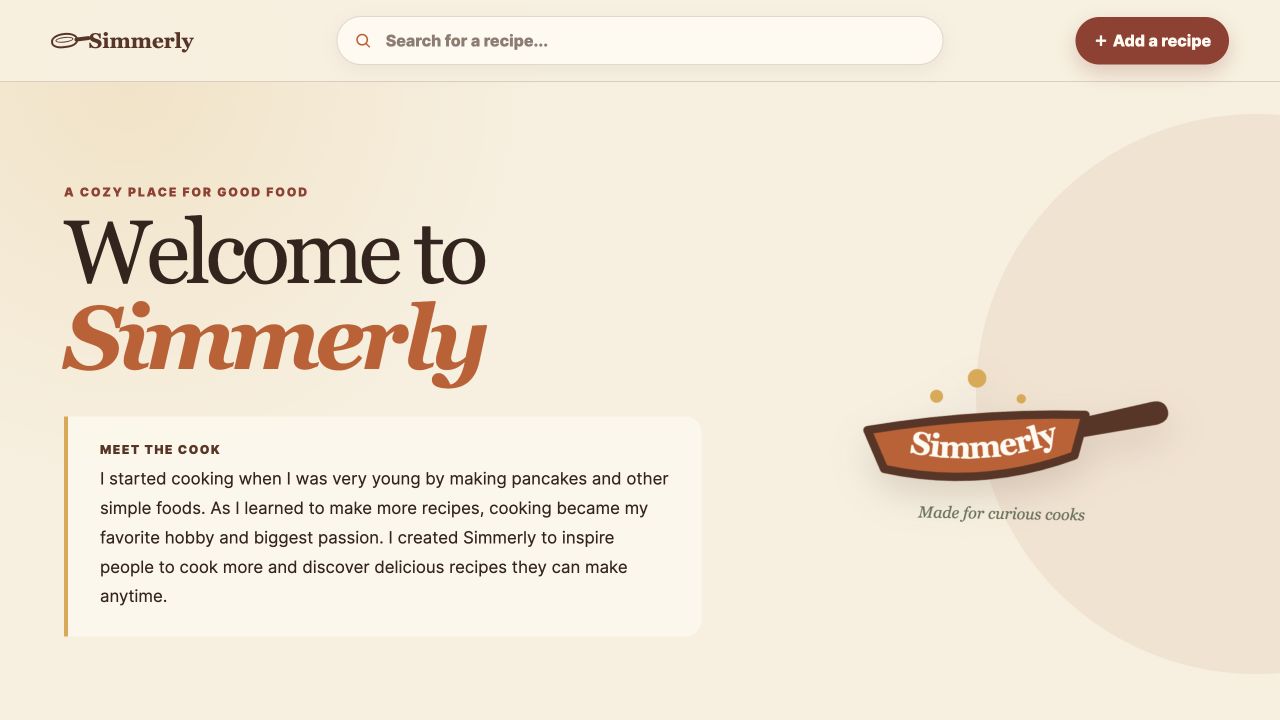
The project makes the skills visible. Planning, giving instructions, testing, and revising become decisions the learner has to make.
Student example · Individual projects varyHow the learning happens
We move between paper, conversation, the computer, and hands-on testing. Davina guides the process and asks questions. The learner makes the choices.
The idea begins with sketches, questions, and a clear purpose before the agent starts building.
Learners explain what they want, make decisions, and hear how another person experiences the idea.
Small working versions make it easier to test, notice, and improve without getting overwhelmed.
Private instruction or a maximum of three learners leaves room for active, personal guidance.
Learners use the real project, find what is awkward, and decide what deserves another pass.
The final share-back focuses on the thinking behind the project, not only how polished it looks.
Age-appropriate, adult-operated access for younger learners. No sensitive personal information in projects. Files stay local and private unless the family separately approves publishing or outside services.
You leave knowing what comes next
Your child presents what they built and explains their choices. Then I show you how to open the project, find the saved files, access the tools, and support the next steps.
For safety, a parent or guardian must remain in the home throughout every tutoring session, even if they are not sitting with us. The final 45-minute handoff is required. You’re also welcome to join earlier sessions and learn alongside your child.
The support continues: six months of email guidance on the fundamentals, systems, agent, and project covered in the program. New lessons or building on the learner’s behalf are separate.
Time, pricing, and setup
Choose private instruction for one child, or bring together a group of siblings or friends. Make With AI does not assemble groups of unfamiliar learners.
Private instruction
One learner. Their pace. Their project.
Your small group
Up to three learners who already know one another.
Pricing covers the complete program. Timing and availability are confirmed personally before booking.
A laptop or desktop with a keyboard, charger, and reliable internet. You’ll receive a setup guide before Session 1. See the FAQs below for the required subscription and other setup details.
Publishing the project is optional and may involve separate provider fees. Your child does not need a finished idea before starting.
Maker Studio questions
New to AI yourself? You do not need to figure out the setup alone.
Maker Studio is for ages 10 to 13. It is designed for curious young people who want to understand AI and use it to build something they imagined. No coding experience is required.
Maker Studio is available privately or for a family-assembled group of up to three learners who already know one another.
A laptop or desktop with a keyboard, charger, stable internet, and a ChatGPT Plus subscription, currently $20 per month. The subscription is the only required cost beyond the program. Families receive a complete setup guide before Session 1. If a family later approves publishing or another outside service, the provider may charge a separate optional fee.
They leave with a working AI agent they built and can explain, an original digital project, saved project files, take-home reference materials, and a repeatable process they can use to improve this project or begin another one.
For safety, a parent or guardian must remain in the home throughout every tutoring session, even if they are not sitting with us. Parents are welcome to sit in throughout and must join the final 45 minutes so the learner can present the project and the parent can learn how to access and support it.
For six months after the program, the learner or parent can email Davina with questions connected to what they learned, including AI systems discussed, core fundamentals, their agent or project, and ways to continue practicing. This guidance supports continued learning related to the program. It does not replace a new teaching session or include building something on the learner’s behalf.
Two hours is the plan for each session, but the program is shaped around the learner and their project. A session may finish slightly earlier or run slightly longer when the work reaches a more natural stopping point.
Build Lab adds professional development tools and a deeper technical workflow.
The next step
Tell me a little about your child and your preferred timing. I’ll reply personally within 2 business days about fit, availability, and next steps.
Ask about a program
Share the program you are considering and your preferred timing. You do not need to have a project idea yet. I will follow up personally about fit and availability.
Prefer a separate window? Open the same inquiry form ↗