An understanding of AI beyond chat
Learn how agents, reusable skills, tools, APIs, and MCP connections work together. Understand what each can do, when to use it, and what information or permissions it needs.
 Check availability
Build Lab · Ages 14–18
Build a website, app, or dashboard they might otherwise need a developer’s help to create, and open their eyes to what’s possible with AI.
The project is how we teach. Across four in-home sessions, your teenager explores the tools behind AI and learns to apply them to business, personal interests, and everyday life. They leave with a foundation they can keep using as their ambitions grow.
No coding experience needed · Reno, Los Angeles & NYC dates
AI in his own life · Adam, 15 years old
Adam, 15 years old, built a dashboard to track his sneaker sales, cost of goods sold, shipping, and taxes. Through the build, he learned how AI can help him understand the finances behind his business and make more informed decisions.
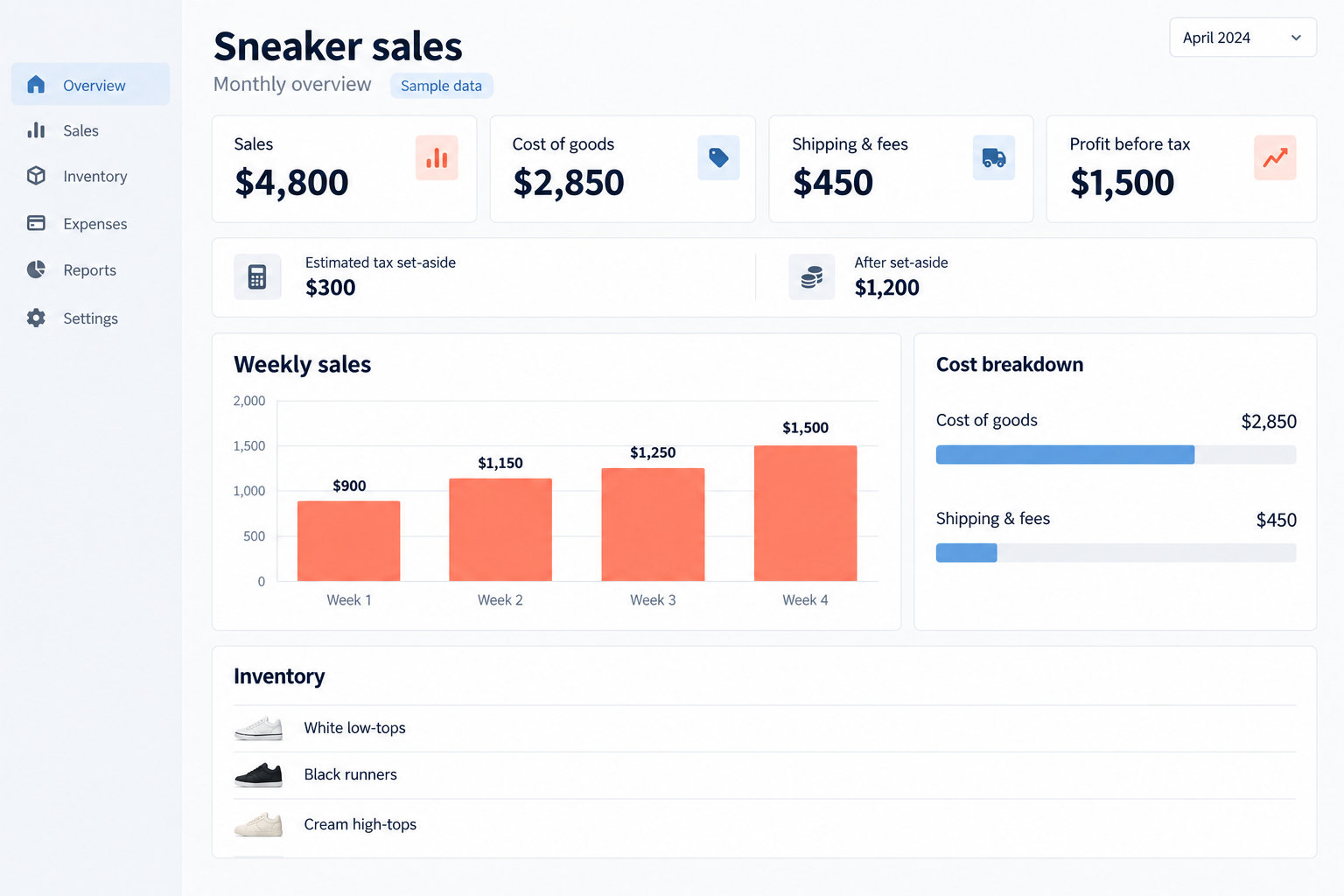
Adam now has a dedicated agent to help him analyze costs, understand margins, and compare business decisions as he grows. He can explore pricing, plan a website, or simplify routine work alongside school. The lasting value is knowing how to use AI to become more capable in something he cares about, while checking its calculations and assumptions.
What they take with them
A project gives every new concept a practical use. Students learn how the parts of AI work together, then practice applying that understanding to a different purpose.
Learn how agents, reusable skills, tools, APIs, and MCP connections work together. Understand what each can do, when to use it, and what information or permissions it needs.
Use AI to explore business ideas, analyze information, build websites or apps, organize a personal project, or develop a creative interest. Practice choosing the right approach for a new goal.
Compare options, question recommendations, check facts and calculations, and protect private information. Learn where AI helps and where their own judgment matters.
Keep their original project, its agent, and a separate personal agent they set up and test for another purpose. Saved instructions, files, and reference materials support continued practice.
The learner or parent can email Davina with questions about the fundamentals, tools, agents, and project covered in the program, including how to keep practicing what they learned.
Four two-hour sessions
Eight hours, including breaks. Their project is the teaching tool: each stage introduces AI concepts they can use again elsewhere. Their own build begins in Session 2.
Session 1
Get a working agent in place, see how Davina builds a website, and choose a project with a purpose.
Session 2
Turn an interest into a clear brief and a first version they can try.
Session 3
Work through the missing pieces and check whether the result does what it should.
Session 4
Explain the finished project, then build and test a separate agent for life beyond it.
The pace responds to the learner. The final session protects time to create and test the second agent, so they practice starting again with a different purpose.
Build Lab opens up that wider world: agents that work with files, skills that teach them new tasks, and connections to useful tools and information. Teens learn through a project, then carry those capabilities into their own interests, business ideas, and everyday life.
Personal guidance, clear boundaries
Davina teaches each session, connecting the work on screen to a broader understanding of AI. Students learn what each tool does, when it is useful, what access it needs, and how to check its output. They practice carrying those skills into another part of their life.
Parents are welcome to sit in on every session and learn alongside their teenager. We especially encourage you to join at least the final 15 minutes of the program to see what they built, understand more of what AI can do, and review the safety features and boundaries we’ve covered. A parent or guardian must remain in the home throughout every tutoring session.
Project files stay local and private by default. Publishing, sharing, paid services, and outside connections require separate family approval.
Time, pricing, and setup
Choose private instruction, or bring together siblings or friends who already know one another. Each learner chooses their own project.
Private instruction
One learner. Their interests. Their pace.
Your small group
A group your family brings together.
Timing and availability are confirmed personally before booking. In-home instruction in Reno and Los Angeles, with New York City dates on request.
A laptop or desktop, charger, reliable internet, Codex desktop, and a ChatGPT Plus subscription. You’ll receive setup guidance before Session 1.
The subscription is separate from the program fee. Any optional service or publishing costs are discussed with the family before use.
Build Lab questions
Ages 14 to 18, with no coding experience required. It suits a teenager who wants to make something useful, explore an interest, or understand how to work with AI more independently. They do not need a finished project idea before starting.
No. Davina uses a website as a live teaching example, but each learner chooses their own project. It could be a game, app, dashboard, analysis, business plan, brand, presentation, or useful workflow. The project gives us a way to teach transferable AI skills. Together, we choose a first version that fits the time available.
Learners work in Codex desktop with local project files. They learn how agents, skills, command-line tools, plugins, APIs, and MCPs expand what AI can do. A skill gives an agent reusable instructions for a task; an API lets a project use an outside service; an MCP connection gives an agent access to tools and information. They learn how to choose appropriate tools, manage permissions, and check results. The class project makes these concepts concrete, with connections added when useful.
An AI assistant with a defined job, working instructions, and saved context. Students first shape an agent for their class project. In the final session, they set up a second agent for a different purpose, test it on a real task, correct its instructions, and practice reopening it. They leave knowing how to repeat that process.
A laptop or desktop with a keyboard, charger, reliable internet, and access to Codex desktop. A ChatGPT Plus subscription is required separately from the program fee. You will receive setup guidance before Session 1, including the appropriate account and supervision arrangements. Optional paid APIs, integrations, or publishing services are discussed with the family before use.
Parents are welcome to sit in on all sessions and learn too. We especially encourage joining at least the final 15 minutes of the program for the learner’s demonstration, a look at AI’s wider capabilities, and a review of safety features and boundaries. A parent or guardian must remain in the home throughout every tutoring session. Private instruction is available, or your family can bring together a group of up to six learners who already know one another.
They keep their project files, agents, and reference materials. Six months of follow-up email guidance covers questions connected to what they learned and how to continue practicing. It does not include new teaching sessions or building things on their behalf. Publishing a project is optional and requires separate family approval.
Maker Studio offers a guided introduction to building with AI.
The next step
Tell me a little about your child and your preferred timing. I’ll reply personally within 2 business days about fit, availability, and next steps.
Ask about a program
Share the program you are considering and your preferred timing. You do not need to have a project idea yet. I will follow up personally about fit and availability.
Prefer a separate window? Open the same inquiry form ↗